


Parental Control App- FamiSafe
4.41.19K Reviews
App Specs
- Version
- 9.0.55.0729
- Updated On
- License
- Free
- Downloads
- 5,000,000+
- Developer
- Shenzhen Wondershare Software Co., Ltd.
- Categories
- Parenting
- Platform
- Android, iOS
Screenshots
 Analysis by AppCompare
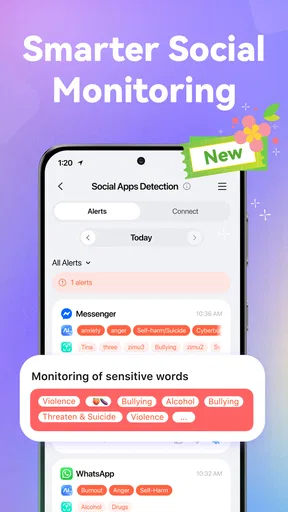
When I choose a parental-control app, I’m looking for a balance: enough visibility to handle a genuine safety concern, but not so much monitoring that every ordinary moment becomes a report to inspect. FamiSafe is built for parents who want practical oversight of a child’s phone, including ways to manage app access and check location. Its emphasis on social-media detection also makes it relevant to families who are working through online habits, not just screen-time rules. I’d treat it as a tool for starting conversations and setting boundaries, rather than a substitute for either.
Start with the family’s actual problem
Before installing a control app, I’d decide what I’m trying to change. Is the main worry a child arriving home safely, distraction during homework, or exposure to unsuitable material? Those needs overlap, but they are not identical. FamiSafe is most compelling when a parent wants several kinds of oversight in one place. If the concern is only agreeing on a bedtime, a conversation and a simple household routine may be less complicated than adding another app.
The app is free to download, with in-app purchases ranging from $5.99 to $109.99 per item. I would check which functions matter to my family before paying for anything, then consider whether the available plan and its terms fit our needs. The broad price range makes it especially sensible to avoid buying on impulse. Its Everyone age rating describes the app’s content rating; it doesn’t mean every monitoring approach is suitable for every child or family.
Useful when rules need context
In everyday use, the strongest case for a tool like this is not simply being able to block something. It is having a calmer basis for deciding when a rule needs adjusting. For instance, if a child keeps reaching for social apps during study time, I’d rather use that as a prompt to agree on a focused homework window than make a permanent restriction without explanation. FamiSafe’s social-media focus can help families make online behavior part of that discussion, although an alert or activity insight still needs a parent’s judgment; it cannot tell the whole story behind a child’s choices.
A practical tip is to set expectations together before turning on controls. Explain what you intend to monitor, when you might check it, and what would lead you to change a rule. That small step can reduce the sense of surprise or mistrust that monitoring tools sometimes create. I’d also review settings after a change in routine, such as a new school schedule or a child getting more independence, instead of letting old rules quietly govern a different stage of life.
How it differs from simpler options
FamiSafe belongs in a different decision category from built-in device controls and informal family agreements. A built-in control can be the better fit if you need a straightforward restriction on one device and want to keep setup minimal. A household agreement may be enough when the main challenge is cooperation rather than visibility. FamiSafe makes more sense when a parent wants a dedicated place to consider online activity alongside location and access rules. That wider scope can be useful, but it also means more setup and more responsibility for interpreting what the app shows.
I would not choose it for a teenager who already manages device use responsibly if the only reason is to watch more closely. Nor would I expect any parental-control app to resolve a disagreement about trust or replace an honest talk about social media. If your family values minimal monitoring, or a child uses devices you are not planning to manage through the app, a simpler approach may fit better. The right choice depends less on how many controls an app offers and more on whether you can explain why each one is there.
Worth Reading Before You Choose

EA SPORTS FC Mobile 26 Is a Bigger Football Game, but It Takes Time

Flipboard Shows What News Apps Must Do Beyond the Feed

Switching to Android Auto Means Rethinking Your Driving Routine

Google Calendar Makes a Crowded Week Easier to Manage

Ludo King Makes the Most of the Minutes Between Plans

Baby Panda World Brings Quick Play to Modern Phones, but Its Game Library Feels Busy
Getting Started with FamiSafe
First things first, setting up FamiSafe was a breeze. I hopped onto their website, downloaded the app on both my phone and my kid's device, and voilà! The installation process is user-friendly, and the app guides you step-by-step, ensuring you don’t miss a beat.
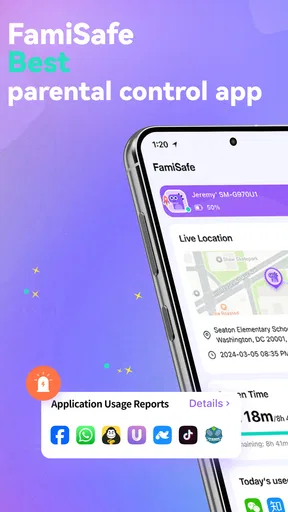
Once you’re in, the app opens up to a clean and intuitive interface. You’re greeted with a dashboard that gives you a quick overview of your kid’s activity. It's like having a digital command center in your pocket.
Features that Stand Out
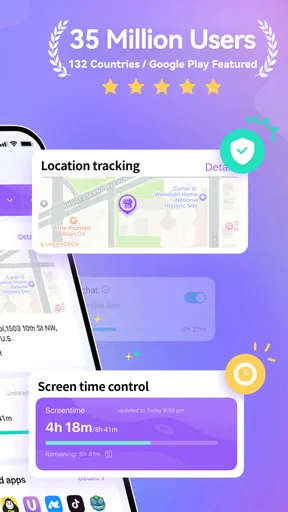
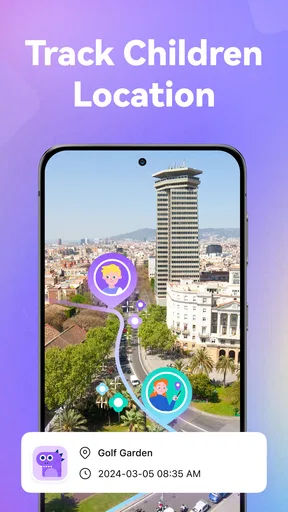
Let’s dive into the features because that's where FamiSafe really shines. One of my favorites is the real-time location tracking. As a parent, knowing where my kid is gives me peace of mind. The geofencing feature is a cherry on top. I can set up safe zones, and I get notified if my kid steps outside of them. It’s like having a virtual leash, but in a good way.
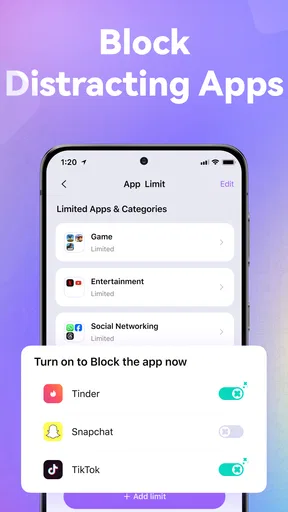
Another feature that blew me away is the app blocker. With just a few taps, I can restrict my kid’s access to certain apps. This is super handy during study hours or bedtime. And let's not forget the web filtering feature. It helps me block inappropriate content, ensuring my kid’s online environment is safe.
Performance and Usability
Performance-wise, FamiSafe runs smoothly. It doesn’t hog up too much space or drain the battery, which is a big plus. The app’s design is straightforward, making it easy for even the least tech-savvy parents to navigate. I found the notifications to be prompt and reliable, keeping me updated without overwhelming me with alerts.
Why FamiSafe is a Game Changer
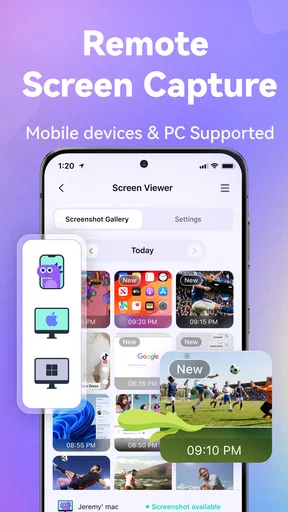
What really sets FamiSafe apart is its focus on education rather than just restrictions. The app provides insights into your child’s digital behavior, helping you understand and guide them better. It’s not just about control; it’s about fostering healthy digital habits.
I also appreciate the customer support. They offer comprehensive guides and are quick to respond to queries, which is a lifesaver when you're grappling with the nuances of digital parenting.
Using alerts without letting them run the household
Location notifications are most helpful when they answer a specific question, such as whether a child has reached an agreed destination. I’d start with only the places that matter to our routine and resist adding a boundary for every stop. Too many alerts can turn a useful safety check into background noise, making it easier to overlook the one notification that deserves attention. Before relying on a location update, I’d also make sure the child understands the arrangement and knows how to contact me if plans change.
For a realistic example, imagine a child walking home after an after-school activity while a parent is still at work. A location check or a safe-zone notification may reassure the parent that the agreed route has reached its expected end. It does not replace a pickup plan, a call when plans change, or judgment about an unusual delay. I see location tools as a backup for family communication, not a reason to stop communicating.
Make restrictions specific and temporary
The app blocker is easier to use fairly when a restriction has a clear purpose and an end point. A parent might agree that selected apps are unavailable during a homework session, then revisit the arrangement once the work is done. That is more constructive than treating a block as punishment or applying the same rule indefinitely. If a child needs a particular app for school or a family task, check that exception before setting a rule; a control that interrupts a legitimate activity can quickly undermine cooperation.
Web filtering also calls for realistic expectations. Filtering can help reduce exposure to content a parent considers unsuitable, but it is not a promise that every difficult page or online interaction will be handled perfectly. I would pair it with age-appropriate conversations about what to do when something upsetting appears: close it, avoid responding, and tell a trusted adult. This is one reason I would not rely on settings alone, especially as a child becomes more independent online.
Setup is a family workflow, not just an install
The setup description makes the process sound straightforward, and guided steps are welcome, but parents should plan for both devices to be configured and for the child to understand what is changing. FamiSafe is developed by Shenzhen Wondershare Software Co., Ltd.; on Android, the listed minimum operating system is Android 5.0, and the current version is 9.0.5.0202. Those details are useful when checking a device before beginning. I’d also take a moment to confirm that the app is installed on the devices the family actually intends to manage, rather than assuming one setup automatically covers every phone or tablet at home.
Families often ask whether this is suitable for younger children or older teens. Its Everyone content rating means the app itself is rated for a general audience, but the more important question is how the family will use it. Younger children may benefit from clear location and access rules explained in simple terms. With an older teen, I’d favor agreed limits and transparent check-ins; secret or overly broad monitoring can damage trust and make the tool counterproductive.
Another common concern is whether a parent needs to be especially technical. The guided setup and straightforward dashboard are reassuring for less confident users, but the work does not end at installation. Parents still need to choose sensible rules, decide which alerts merit action, and revisit settings when circumstances change. If you want a control that runs without ongoing thought, this is not the right expectation for any app that reports on a child’s online life.
What the audience signal does—and does not—tell me
FamiSafe has a 4.3 average from around 15,000 ratings, with roughly 1,200 written reviews and over 5 million installs. That suggests a sizeable audience and gives a prospective user more public feedback to consider, but popularity cannot guarantee that every feature will suit a particular device or parenting style. I’d use those figures as context, then judge the app by whether its controls solve a real problem in our own household.
On Android, FamiSafe is available for free, and the listed in-app purchases span $5.99 to $109.99 per item. I would treat that as a reason to inspect the purchase choices carefully, not as evidence that every family must pay or that a particular purchase is necessary. The app has been available since July 13, 2018, and its current Android version is 9.0.5.0202. Its Everyone rating is about the app’s content, while the suitability of monitoring still depends on a child’s age, maturity, and the family’s approach.
Who should choose another route
If your household only needs a basic device limit, built-in parental settings may be simpler and may avoid adding a separate service to the family routine. If the challenge is a child resisting bedtime or homework, a shared schedule and consistent follow-through can address the cause more directly than a technical restriction. And if your priority is to keep a teen’s digital life private unless a specific concern arises, I would start with conversation and agreed boundaries rather than continuous oversight.
FamiSafe is a more natural fit for parents who have a concrete reason to combine location awareness, app limits, web filtering, and attention to social-media behavior. The trade-off is that a broader tool can create more decisions: which controls to enable, how to explain them, and when to loosen them. I would not turn on every available safeguard simply because it exists. A smaller set of rules that everyone understands is often more useful than an elaborate setup no one can follow consistently.
Final Thoughts
Overall, FamiSafe is a robust tool for parents who want to stay in the loop about their kid’s online activities. It combines ease of use with powerful features, making it a worthwhile investment for any parent. Whether you’re a tech whiz or a complete novice, this app has got your back in the digital parenting game.
Ready to give it a whirl? You can download it from the App Store or Google Play and see for yourself how FamiSafe might just be the digital co-pilot you’ve been searching for.
Pros
- User-friendly interface for easy navigation.
- Real-time location tracking for child safety.
- App blocking to limit screen time effectively.
- Geofencing alerts for safe zone monitoring.
- Activity reports to monitor app usage trends.
Cons
- Premium features require a subscription.
- Limited features in the free version.
- Occasional delays in real-time updates.
- Initial setup can be time-consuming.
- Some compatibility issues with older devices.
FAQs for Parental Control App- FamiSafe
What features does FamiSafe offer for parental control?
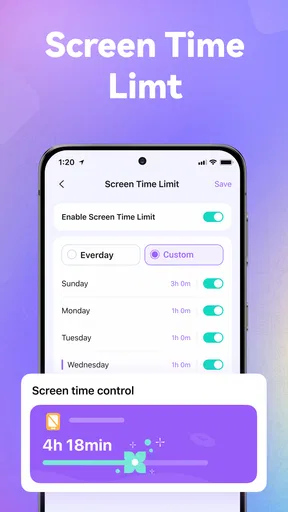
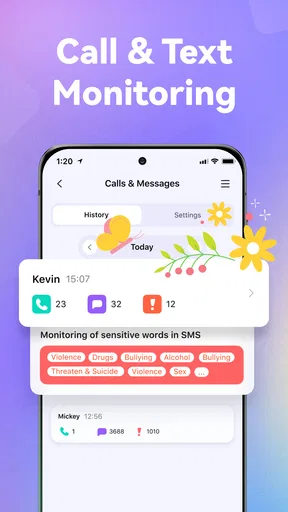
FamiSafe provides a comprehensive suite of features designed to help parents monitor and manage their children's device usage. Key features include real-time location tracking, app usage monitoring, screen time control, and web content filtering. Additionally, it offers geofencing alerts and the ability to set safe zones, ensuring your child's safety both online and offline.
Is FamiSafe easy to set up and use?
Yes, FamiSafe is designed with user-friendliness in mind. The setup process is straightforward, requiring the installation of the app on both the parent's and child's devices. Once installed, the intuitive interface allows parents to easily navigate through the different features and settings, making it accessible even for those who are not tech-savvy.
How does FamiSafe ensure data privacy and security?
FamiSafe prioritizes user privacy and data security by employing advanced encryption protocols to protect all transmitted data. The app collects minimal personal information and does not share data with third parties. Parents can rest assured that their family's data is securely stored and handled according to strict privacy standards.
Can FamiSafe be used on multiple devices?
Yes, FamiSafe supports multiple devices, making it ideal for families with several children. Parents can manage and monitor multiple devices from a single account, providing a centralized platform for overseeing all their children's activities. This flexibility ensures comprehensive coverage across both Android and iOS platforms.
Does FamiSafe offer a trial period or subscription options?
FamiSafe offers a free trial period, allowing parents to explore its features before committing to a subscription. After the trial, various subscription plans are available, including monthly, quarterly, and annual options. These plans provide flexibility and cost-effectiveness, catering to different family needs and budgets.


